You built your WordPress website, got everything looking the way you want, and launched it. Then you go to Google, search for your business, and… you can't find it.
This is something I've seen quite a few times working with WordPress websites, and there isn't always one simple reason for it. Firstly, it's important to understand that having a website online doesn't automatically mean Google is going to show it in search results. Google still has to find your website, crawl it, understand what your pages are about, and decide where those pages belong in its results.
The good news is there are quite a few things you can check yourself before assuming something is seriously wrong.
Quick answer
If your WordPress website isn't showing up on Google, start by checking the page in Google Search Console. If Google says the page is indexed, you're probably dealing with a ranking problem rather than an indexing problem. If it isn't indexed, check your WordPress visibility settings, sitemap, robots.txt, and indexing configuration first.
Start With Google Search Console
The first place I recommend looking is Google Search Console. If you own a website and care about getting traffic from Google, I strongly believe Search Console is one of the most useful tools you can have set up. It lets you see how Google is actually interacting with your website instead of guessing.
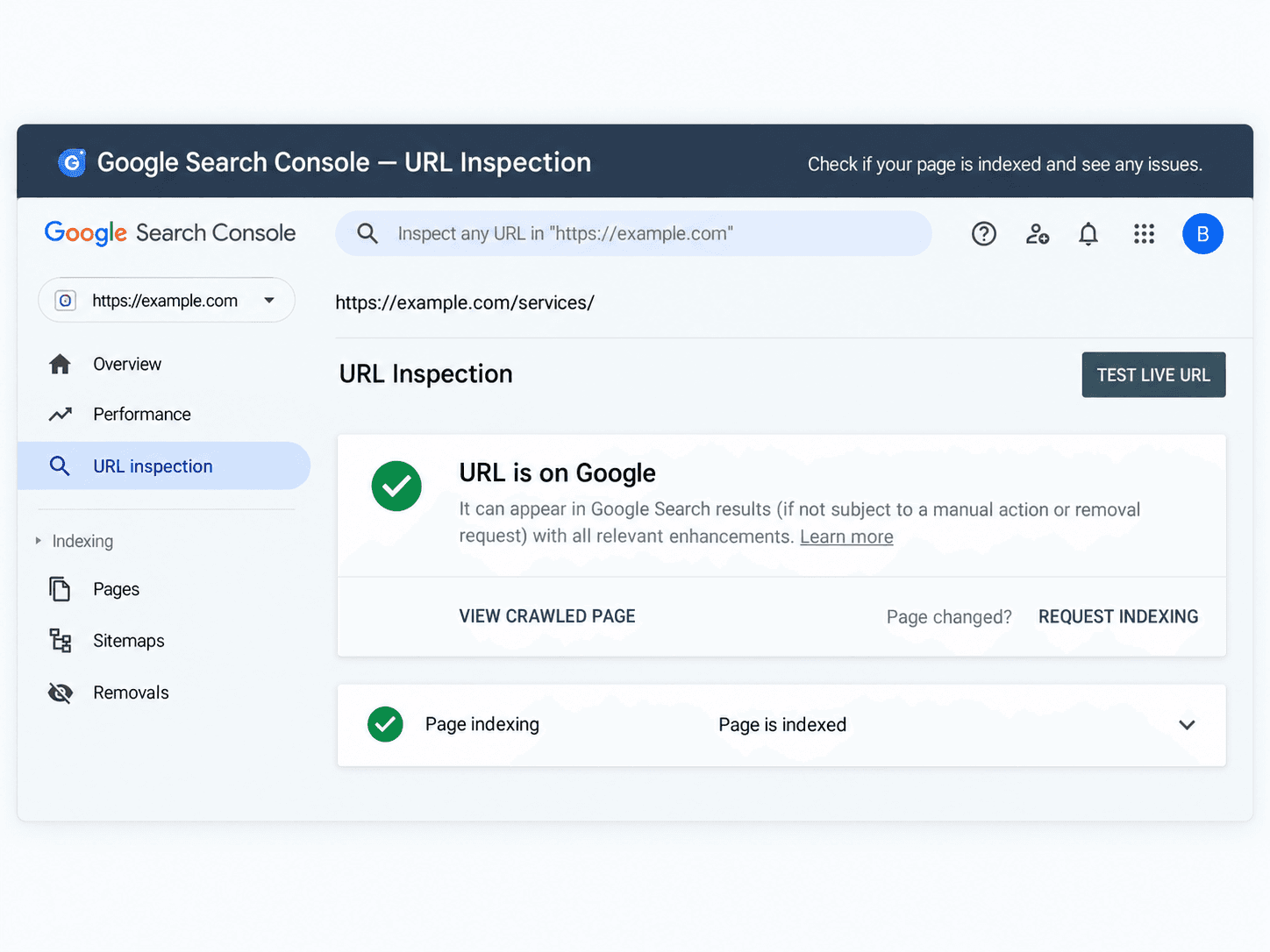
One of the first things I would do is take the page you're having trouble with and put the complete URL into the URL Inspection tool. Google will tell you whether the page is indexed.
If it is indexed, that's good news. Google knows the page exists. At that point, the problem may be that the page just isn't ranking very well yet.
If it isn't indexed, then we need to figure out why. Before changing a bunch of things on your website, I always recommend figuring out what the actual problem is first.
Why spend hours trying to improve rankings for a page Google can't even find?
Make Sure WordPress Isn't Hiding Your Website
This sounds simple, but it's worth checking.
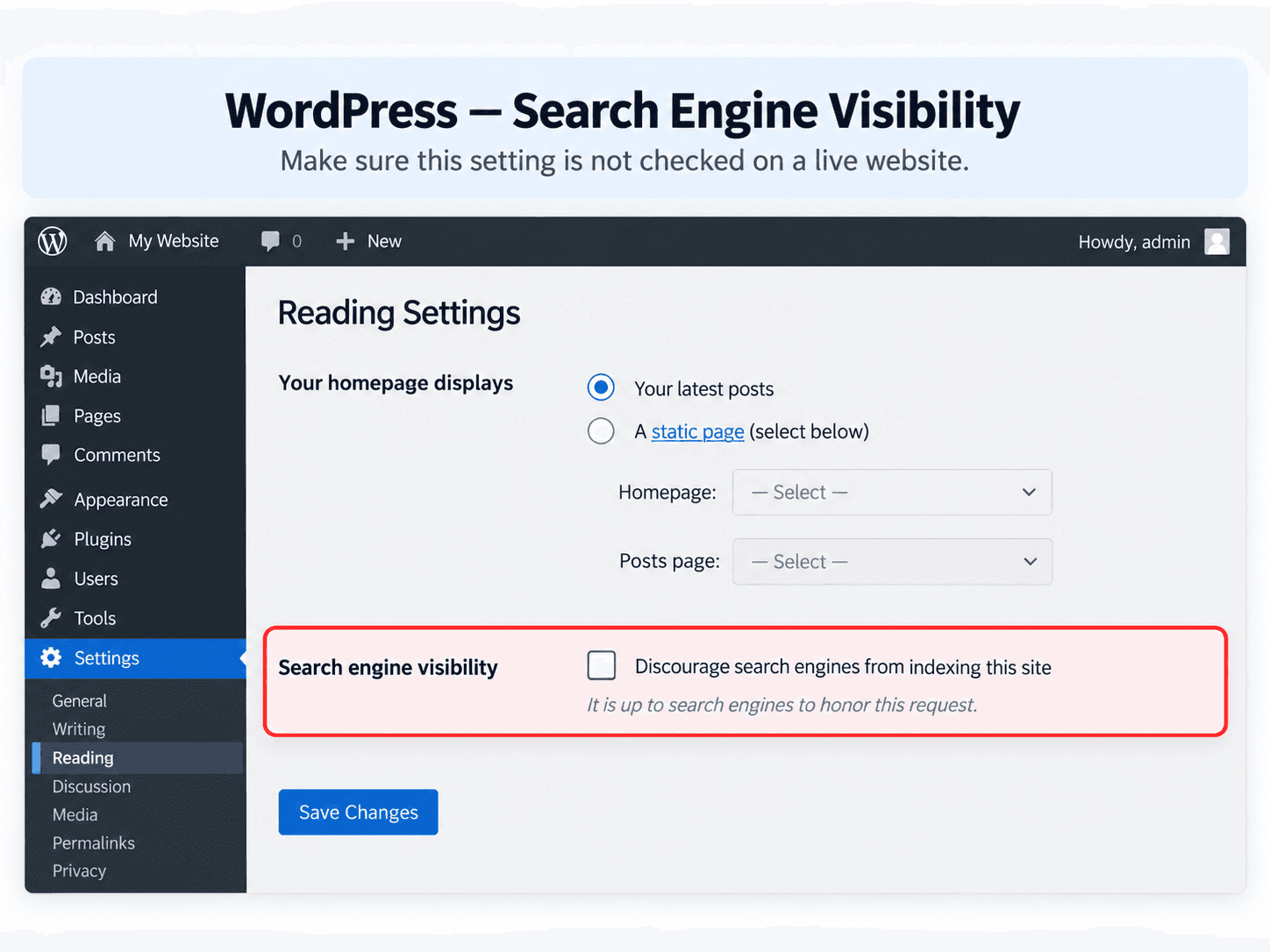
WordPress has an option under:
Settings → Reading
You'll see an option that says:
Discourage search engines from indexing this site
This can be useful while you're developing a website and don't want it showing up in search results yet. The problem is when the website launches and that setting gets left on. If you're trying to get traffic from Google, you generally don't want your live website telling search engines to stay away.
Your SEO plugin can also have indexing settings of its own, so if only one page is having a problem, I recommend checking the settings on that page as well.
Check Your Sitemap
Next, I would make sure your website has an XML sitemap and that you've submitted it to Google Search Console. A sitemap is basically a list of the important pages on your website that helps search engines discover your content. Most modern WordPress SEO plugins will create one for you automatically.
A sitemap doesn't guarantee that every page will rank, but it gives Google a much easier way to understand what pages exist on your website. This becomes even more important when you've recently launched a new site, added a bunch of pages, or changed your URL structure. After building or rebuilding a website, this is one of the things I always want to verify.
SEO Plugins Are Helpful, but They Aren't Magic
The original version of this article that I wrote years ago focused heavily on plugins like Yoast SEO, caching plugins, and image optimization plugins. I still think those tools can be very useful. I just wouldn't tell somebody today that installing three plugins is suddenly going to make their website rank higher.
A plugin like Yoast or another SEO plugin can help you manage things like:
- Page titles
- Meta descriptions
- XML sitemaps
- Canonical URLs
- Indexing settings
- Other technical SEO details
Those things are important. But the plugin still doesn't know your business like you do.
It can't make a weak page useful. It can't build your reputation. It can't automatically make Google decide your website is the best result.
I look at an SEO plugin as a tool for implementing SEO, not the entire SEO strategy.
Give Your Important Services Their Own Pages
This is another thing I see quite often on small business websites. A company will have one Services page with a short paragraph mentioning every service they offer. That might work fine for someone who's already on the website, but it doesn't give search engines much information about any individual service.
For example, if you're a contractor offering:
- Kitchen remodeling
- Bathroom remodeling
- Basement finishing
- Deck construction
I would usually rather see useful individual pages for those important services than one page with a sentence about each one. The same applies to my own website.
I offer web design, WordPress development, website maintenance, SEO, and other development services. Those are different enough that they deserve their own pages. This also gives you more opportunities to show up when somebody searches for the exact service you provide.
You don't need to create hundreds of pages just to have hundreds of pages. I strongly believe every page should actually have a purpose.
Make It Obvious What the Page Is About
Your page title and content should make it pretty easy to understand what somebody is going to find on that page. For example:
Services | ABC Company
doesn't tell Google or the person searching very much.
Something like:
Kitchen Remodeling in Colorado Springs | ABC Company
is much more specific.
Of course, just changing the title isn't enough. The page itself should actually talk about kitchen remodeling in Colorado Springs.
Explain what you offer. Answer questions customers commonly have. Show examples of your work if you can. Talk about your process. Explain what makes your service different.
Write the page for an actual person who is considering hiring you.
I think this is where SEO sometimes gets overcomplicated. You don't need to repeat the exact same keyword over and over again. You need to make it extremely clear what you do and provide enough useful information that the page deserves to exist.
Don't Forget About Internal Links
Next, let's talk about links within your own website. If you create a really important service page but nothing else on your website ever links to it, you're not doing that page any favors.
Internal links help people move around your site, but they also help search engines understand how your pages are related. For example, if I write an article about how much a small business website costs, it makes sense for me to link from that article to my web design services. If I write about why a WordPress website isn't appearing on Google, it makes sense to link to my SEO services.
These links are useful to the reader and they give Google some additional context. I like to think of a good website as being connected together rather than having a bunch of pages sitting by themselves.
Website Speed Is Still Important
Performance was one of the biggest topics in the original article I wrote, and I still believe it's important. I've worked on plenty of WordPress websites that became unnecessarily slow over time. Large images, too many plugins, poorly built themes, page builders, external scripts, bad hosting, and old code can all contribute to it.
Years ago, my first suggestion might have been to install a caching plugin and an image optimization plugin. Today, I prefer to figure out what's actually slowing the website down first.
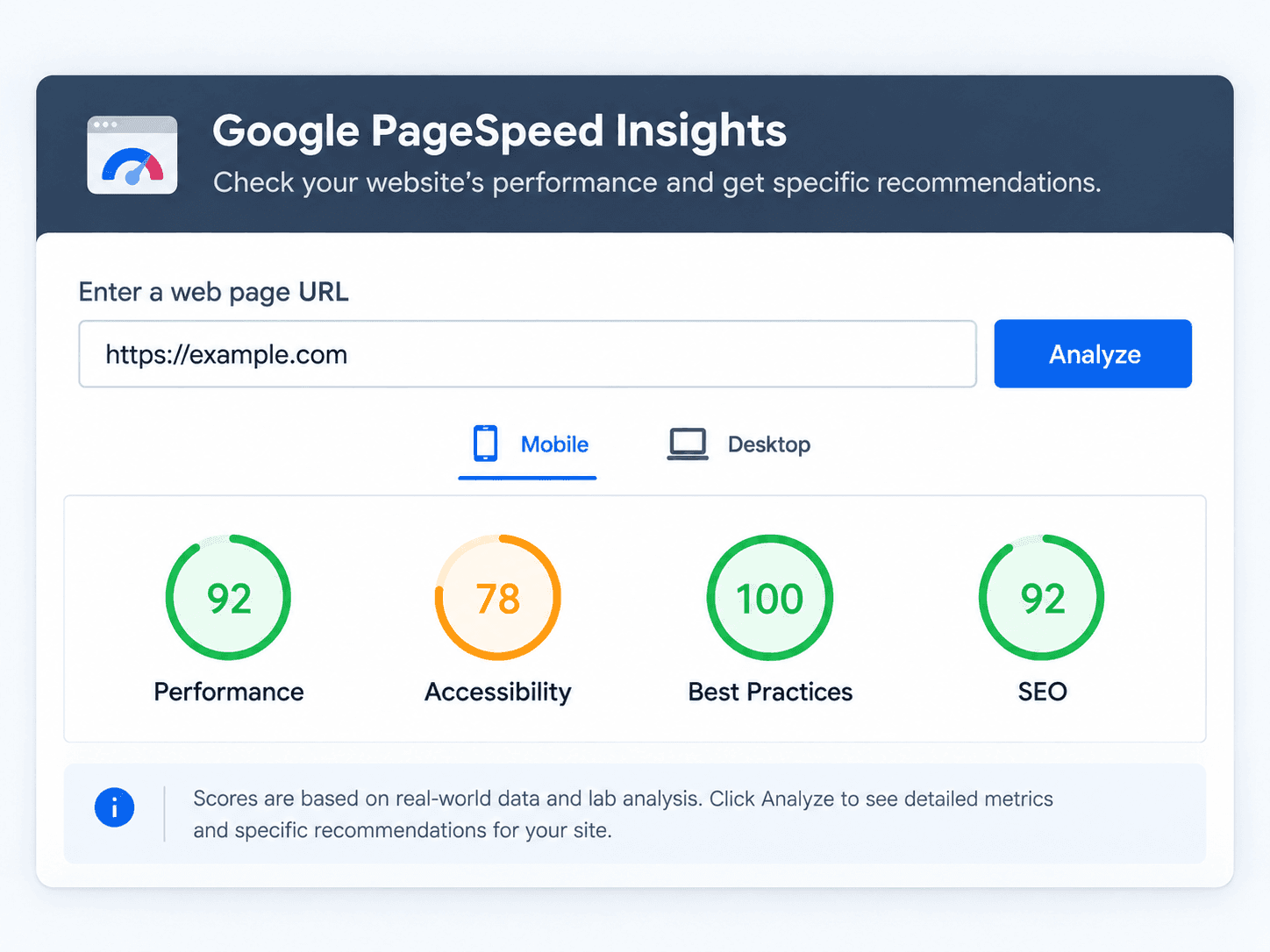
Google PageSpeed Insights is still a great place to start. Run your website through it and look at what it's telling you.
Sometimes optimizing your images makes a big difference. Sometimes caching helps. Sometimes there's a giant JavaScript file slowing everything down. And sometimes the actual WordPress theme is the problem.
I've seen websites where adding another optimization plugin would just be adding one more plugin to an already overloaded website. Figure out the problem first and then fix that problem.
Images Can Make a Huge Difference
I mentioned image optimization quite a bit in my original article because I've seen how much large images can hurt website performance. I still think this is something people overlook.
You want your website to have good-looking, high-quality images. I definitely don't recommend making your website look terrible just to make an automated performance score happy. But there is usually no reason to upload a gigantic image straight from a camera when it's only going to display at a fraction of that size.
Resize images appropriately, compress them, and use modern image formats when they make sense. A beautiful website and a fast website don't have to be two different things.
Being Indexed Doesn't Mean You're Going to Rank #1
This is probably one of the most important things to understand. If Search Console says your website is indexed, Google can find it, and everything technically looks fine, you may simply have a ranking problem instead of an indexing problem.
That takes more work.
Google has to decide why your website should appear above all of the other websites competing for the same search. If you've launched a brand-new website and you're competing against businesses that have been online for ten years, it's probably not going to happen overnight. This is where good content, useful service pages, links, local relevance, website quality, and time all start becoming important.
One thing I like to watch in Search Console is impressions. Even if a new website isn't getting many clicks yet, seeing Google start showing the website for relevant searches is a good sign. It means Google is starting to understand what the website is about.
From there, you have something you can work with.
What I Usually Check
If I'm looking at a WordPress website that isn't getting found on Google, this is roughly the order I like to work through it:
- Can Google access the website?
- Is the page indexed?
- Is something accidentally set to
noindex? - Is robots.txt blocking anything important?
- Is the sitemap working and submitted?
- Does the page actually explain the service or subject well?
- Does the page title make sense?
- Are other pages linking to it?
- Is the website reasonably fast and mobile friendly?
- What searches is Google already showing the website for?
That last one is especially useful. Sometimes I'll look in Search Console and find that Google is already testing a website for searches the business wants to rank for, just much farther down in the results. That's a very different situation from Google having no idea what the website is about.
Keep Improving It
SEO isn't really something I consider finished. You don't need to constantly redesign your website, but you should continue improving it as you learn more.
Add useful content. Improve older pages. Answer questions your customers actually ask. Keep your WordPress installation healthy. Watch Search Console. Pay attention to performance. Build links and mentions naturally as your business grows.
Over time, you're giving Google more information about your website and more reasons to trust it. That's a much better strategy than installing an SEO plugin, getting a green light next to your keyword, and assuming the work is finished.
Need Help With Your WordPress Website?
If your WordPress website is online but you're having trouble getting it found on Google, I can take a look at it and help figure out where I would start. I work with WordPress websites, technical SEO, website performance, Search Console, indexing issues, content structure, and other problems that can affect how a website performs in search.
You can learn more about my SEO & Search Visibility services or request a free website review.
There aren't any tricks that guarantee you're suddenly going to be #1 on Google. But there is usually a reason a website isn't performing as well as it could, and figuring out that reason is always where I like to start.